
Quick answer: Contract management software for legal departments (usually called CLM software) is a system that gives in-house lawyers one place to take contract requests, draft from approved templates, review and redline against a playbook, route approvals, store signed contracts, and track obligations and renewals. To choose one, start from your legal team's requirements rather than a vendor's feature list, and test each requirement in a scripted demo using your own contracts.
The checklist below sets out what a legal department typically needs, why legal needs it, and what to ask each vendor to show you. Use it to write your RFP and score demos, then compare the vendors on your shortlist side by side.
Published: January 26, 2023
Updated: November 17, 2026
Legal technology has moved from a convenience to a core part of how enterprises contract. Contract management software helps legal departments standardize workflows, manage risk, and stay compliant as contract volumes, regulatory requirements, geopolitical uncertainty, and deadline pressure all increase.
The Contract Management Software market is expected to grow at an average annual rate of 12.1% throughout the forecast period from 2024 to 2034. The growth is driven by adoption of AI and machine learning, automation of manual processes, and the need for stronger compliance and integration with wider technology ecosystems.
With so much growth, there are thousands of Contract Management Software products on the market. With so many products on the market, the right choice for a legal department is one that serves legal's needs and also fits the company's technology stack, so that sales, procurement, and finance work in the same system. When you are ready to compare vendors, see our guide to the best CLM software solutions.
Requirements Checklist: Contract Management Software for Legal Departments
Most vendor demos follow the same polished script. A requirements checklist keeps the conversation on what your legal department does every day. For each row, decide whether it is a must-have or a nice-to-have, then ask every vendor to perform the test live, using your contracts and your playbook rather than their sample data.
| Requirement | Why legal needs it | What to test in a demo |
|---|---|---|
| Legal intake | Requests arrive by email, chat, and hallway conversation. One front door gives legal what it needs to triage (contract type, value, counterparty, deadline) and shows the business where each request stands. | Submit a request as a business user, including one started from email. Check the required fields, automatic assignment to the right lawyer, and the status view the requester sees. |
| Templates and self-service | Letting the business create low-risk agreements, such as NDAs, on approved terms frees lawyers for higher-value work without giving up control of the language. | Have a non-lawyer generate an NDA through guided questions. Confirm that only approved fallback clauses can be selected and that only legal can change templates. |
| Playbook review | Counterparty paper is where deviations from your standard positions hide. A playbook applied by the software keeps positions consistent across lawyers and offices. | Upload one of your own counterparty agreements. Check that the tool flags deviations from your playbook, proposes redlines, explains each one, and returns them as tracked changes in Microsoft Word. |
| Negotiation history | Lawyers need to know what changed, who changed it, and which version was signed, especially if a dispute arises later. | Run two rounds of edits, compare the versions side by side, and pull the audit trail for the contract. |
| Approval routing | Legal sets the rules for who approves non-standard terms, such as a higher liability cap or new data protection terms, and should not have to enforce them by email. | Ask the vendor to build a rule live, for example routing any change to the standard liability cap to the general counsel. Test delegation when an approver is away and escalation when an approval stalls. |
| E-signature | The signed version must come back to the repository automatically, or the record is incomplete. | Send a contract for signature with your e-signature provider and confirm that the executed copy and its key data return to the repository. |
| Repository and search | Legal is asked every week whether a contract exists and what it says. The answer should not depend on a hunt through shared drives and inboxes. | Bulk-upload a sample of legacy contracts, including scanned PDFs. Search by concept (for example, "termination for convenience") and check the extracted dates and parties against your own reading. |
| Obligations and renewals | A missed notice period can mean an unwanted auto-renewal or a lost termination right. | Load a contract with an auto-renewal and a notice period. Confirm who gets the reminder, when, and what happens if nobody acts. |
| Verifiable AI | Lawyers are accountable for the advice they give, so they need to see where an AI answer came from before relying on it. | Ask questions about specific contracts and confirm that each answer links to the clause it relies on. Ask a question the contract does not answer and see how the tool responds. |
| Security and access | Contracts hold privileged advice, personal data, and commercial secrets. Some matters must be visible only to named people. | Request current security certifications or audit reports, hosting regions, and the vendor's policy on using customer data to train AI models. Log in as a restricted user and confirm what they cannot see. |
| Reporting | A general counsel needs data on volumes, cycle times, and bottlenecks to manage the team and make the case for resources. | Build a report of open contracts by type, stage, and owner, and show turnaround time by contract type. |
| Integrations | Sales and procurement start contracts in their own systems. If legal's tool does not connect to them, data gets re-keyed and contracts get worked outside the process. | Start a contract from a CRM opportunity or a procurement request and confirm that data flows both ways. |
| Legal-owned configuration | Playbooks, templates, and workflows change often. If every change needs IT or the vendor, the system falls out of date. | Ask the vendor to hand the controls to your legal operations lead, who then changes a workflow step and a template clause during the demo. |
| Implementation and adoption | The value depends on getting legacy contracts into the system and getting business users to use it. | Ask for a migration plan for your contract volume, a sandbox, a training plan for business users, and references from legal departments of a similar size. |
How to use the checklist:
- Mark each row as a must-have or a nice-to-have, and add rows for anything specific to your sector or jurisdictions.
- Turn the must-haves into an RFP and a scripted demo. Our CLM RFP guide explains how to structure the RFP.
- Bring three of your own documents to every demo: a standard NDA, a counterparty agreement you negotiated recently, and a scanned legacy contract.
- Have the lawyers and legal operations staff who will use the system score each row, and keep all scores in one sheet so every vendor is judged on the same basis.
For more detail on two of the rows, see our guides to contract redlining software and tracking contract obligations.
Building a Solid Foundation for CLM
While selecting a CLM solution often revolves around features and functionality, the most successful transformations begin before the selection process. A strong foundation starts with a clear understanding of current pain points, both within legal and across other business functions, since different teams have different challenges. Prioritize these pain points, assess weaknesses in the current operating model, and identify opportunities for improvement. Some improvements will require technology; others can be handled with simple process changes.
The Contract Management Maturity Model (CMMM) on page 8 of our white paper, The True Impact of CLM: 4 Ways Advanced Contract Management Provides Enterprise-wide Value, offers a framework for assessing how advanced your organization's contract processes are and where there is room to improve.
Automation is usually how teams move up this maturity scale: standard requests get handled without manual chasing, and contract risk becomes easier to see.
As part of this process, build a strong business case to secure buy-in from key stakeholders. Showing enterprise-wide impact, beyond legal efficiency alone, helps justify the investment and align it with broader business objectives. Our white paper on building the business case for CLM explains how to structure your approach, quantify benefits, and position CLM as a strategic initiative.
Why Choosing the Right Contract Management Software Matters
Once you reach the selection stage, take a holistic view of how a CLM solution will affect efficiency, cost, and legal accuracy across the business. Automation does save legal time, with faster responses to legal requests and fewer contract delays, but focusing only on legal's operational efficiency is a missed opportunity. A business case built only on legal's time savings can be harder to fund than one that treats contract management software as a cross-functional initiative with measurable benefits across the enterprise.
Good contract management software reduces the time legal teams spend on manual, repetitive tasks. It also integrates with other key tools, such as CRM, ERP, procure-to-pay (P2P), and e-signature platforms, which makes it a core part of the enterprise technology stack.
Some of the largest cost savings and revenue opportunities come after signature. Both buy and sell-side business teams can identify and stop up to 9% of revenue leakage across the enterprise. This allows companies to proactively track and manage contractual obligations (including price increases, rebates, SLAs and supplier performance).
Below, we cover the fundamentals of CLM software, its role in business success, its impact across departments, and the key steps for selection and implementation.
Fundamentals of Contract Management Software
What is CLM Software?
Contract management software is an end-to-end solution for managing the contract lifecycle. From initial drafting to renewal, it streamlines each step and turns time-consuming manual tasks into automated workflows. Whether you are handling simple agreements like NDAs or complex master service agreements (MSAs), contract management software can shorten the time from request to signature.
For a plain introduction to the category, see what is contract lifecycle management (CLM)?
Why is it Critical for the Business?
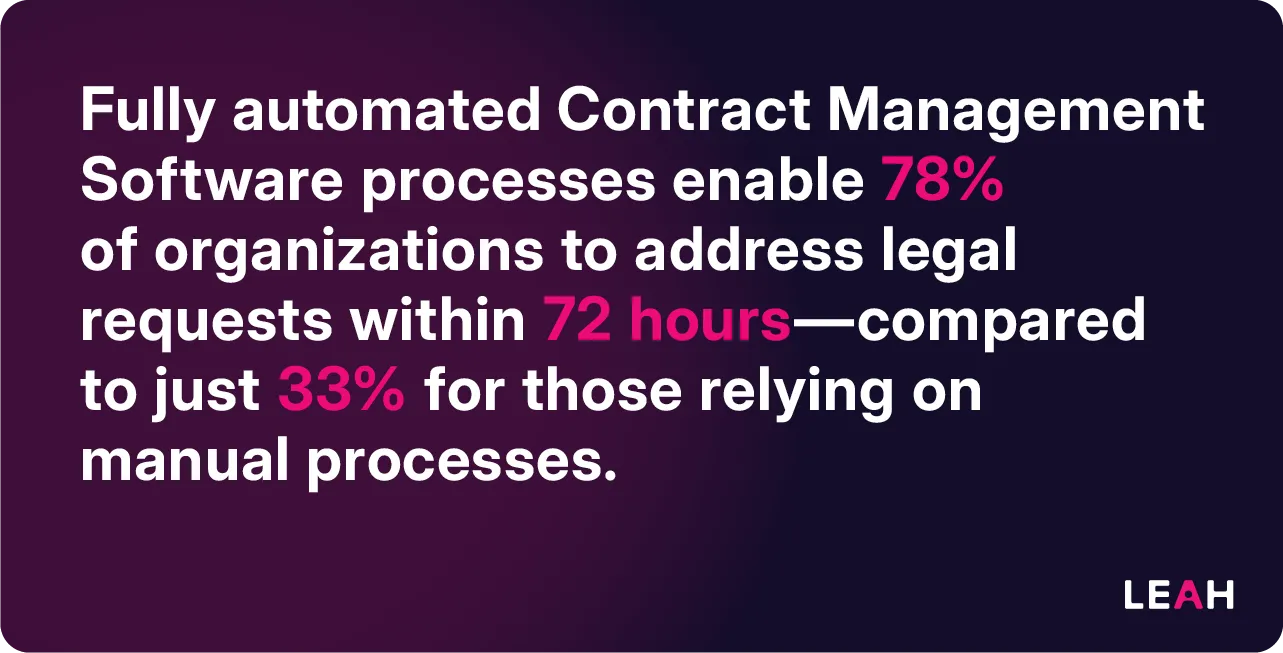
The ability to automate and track workflows is valuable for any team managing a high volume of contracts. With contract management software, teams can stay compliant with legal regulations, avoid missing contractual obligations, and manage risk more effectively. Fully automated Contract Management Software processes enable 78% of organizations to address legal requests within 72 hours—compared to just 33% for those relying on manual processes.
Compliance and Regulatory Considerations
Regulatory compliance is non-negotiable in contract management. A suitable contract management system must support adherence to regulations such as GDPR, SOX, and other jurisdiction-specific requirements. Because contracts often contain personal data and confidential terms, also ask how each vendor protects contract data used by AI. Our guide to AI contract management and data security lists the questions to ask.
Impact on the Whole Enterprise
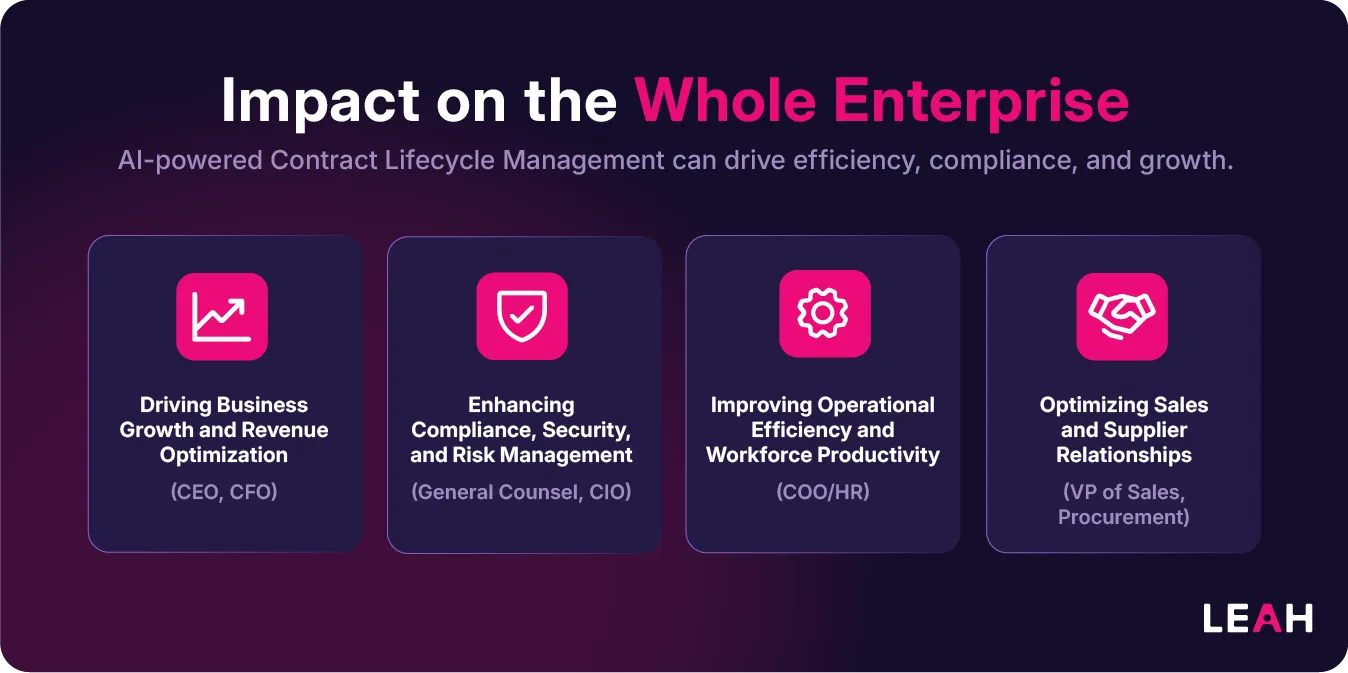
AI-powered contract lifecycle management (CLM) benefits more than legal teams; it changes how contract work gets done across the enterprise. Here are a few ways different departments can use AI-driven CLM to improve efficiency, compliance, and growth:
Driving Business Growth and Revenue Optimization (CEO, CFO)
For leaders focused on business growth, AI in CLM helps drive revenue, reduce financial risk, and improve decision-making:
- Expediting Deal Closures: AI-generated contract drafts and automated workflows speed up negotiations, shortening contract cycles and bringing revenue forward
- Enhancing Financial Performance: Contract analytics help finance teams reduce missed renewals, revenue loss, and unstructured discounting
- Scaling Without Increasing Legal Resources: Automation lets legal support more contract volume as the business grows, with less need to add staff for routine work
Enhancing Compliance, Security, and Risk Management (General Counsel, CIO)
AI-powered CLM supports compliance and risk management by identifying risks early and strengthening security:
- Ensuring Ongoing Compliance: AI monitors obligations, renewal deadlines, and compliance terms, reducing legal risk
- Providing Comprehensive Audit Trails: The system records every contract action, which supports audit readiness and regulatory compliance
- Boosting Data Security: A central system with role-based permissions replaces contracts scattered across email and shared drives and fits into modern IT infrastructure
Improving Operational Efficiency and Workforce Productivity (COO, HR)
AI-driven CLM reduces administrative work by streamlining contract processes:
- Speeding Up HR Agreements: Automating offer letters and employee agreements reduces delays for hiring managers and new hires
- Facilitating Team Collaboration: Shared workflows improve communication and contract visibility across legal, sales, procurement, and HR teams
- Enhancing Workforce Utilization: Automation frees employees to focus on strategic work instead of routine contract tasks
Optimizing Sales and Supplier Relationships (VP of Sales, Procurement)
AI-driven contract management helps sales and procurement teams negotiate faster, manage supplier performance, and improve customer satisfaction:
- Accelerating Sales Cycles: Faster drafting and approvals help sales teams close deals more quickly
- Improving Supplier Performance Management: AI monitors third-party contract compliance, so vendor agreements stay aligned with organizational goals
- Benchmarking Competitive Pricing and SLAs: AI extracts pricing and SLA data from past contracts, giving procurement teams a basis for negotiating better terms
Once stakeholders understand the enterprise-wide benefits, the next step is evaluating the features that will make your CLM solution effective.
Essential Features of Modern Contract Management Software Solutions
Selecting contract management software is a strategic decision that requires more than comparing features. You need to understand how the platform fits your organization's business goals, contract lifecycle management (CLM) maturity, and long-term scalability.
To help you start the evaluation, we've outlined questions for assessing vendors. They cover technology, functionality, support, and cost structure. They are a starting point, not a one-size-fits-all checklist: the right solution depends on your organization's needs and priorities.
Beyond these initial questions, we also cover the advanced capabilities that set modern contract management solutions apart. Asking these questions early helps you find a platform that fits your workflows and delivers the efficiency, intelligence, and automation you need.
Some Questions to Ask When Evaluating Vendors
Technology
- What security certifications does the platform hold?
- How is data encrypted at rest and in transit?
- What is the system's uptime guarantee?
Functionality
- How configurable are the workflows?
- What AI capabilities are included?
- How are template updates managed?
Support
- What level of implementation support is provided?
- How are feature requests handled?
- What is the average response time for support tickets?
Cost Structure
- What is included in the base price?
- Are there additional costs for integrations?
- How is pricing scaled as usage grows?
Some Questions to Ask About Advanced Contract Management Software Features
Contract Workflow Capabilities:
- Does the solution support all contract types?
- Does the solution offer an agreement creation wizard?
- Can users make edits to the contract within the platform?
- Can custom approval rules be configured by contract type?
- Can signature requests be sent directly from your product?
Signature:
- Can the solution integrate with electronic signature systems?
- Where is the final document stored?
- Does the platform enable additional methods of acceptance, including click-to-accept?
- Describe the counterparty experience.
- Can files be stored in a cloud storage system?
Document Repository:
- Does the solution provide centralized, electronic storage of all contracts?
- Does the solution provide the ability to view obligations within contracts?
- Can contracts be uploaded in bulk, and is there a volume threshold?
- Does the solution use AI/ML capabilities for document analysis?
- Is there assisted migration and onboarding for legacy contracts?
Contract Negotiation:
- Can versions generated during contract negotiations be compared side by side?
- Does the solution provide a full audit trail of activity?
- Can users include comments for every approval or denial?
- Does the solution support renewal options?
- Can approvals be collected via email?
Collaboration:
- Does the solution provide the ability for counterparties to view or log into your system?
- Does the solution support sending emails with attached contract drafts?
- Can you set automated reminders around key events in contracts?
- Does the solution provide knowledge management features?
- Describe features for cross-functional collaboration.
Reporting:
- Does the solution provide the ability to report on contracts by type, category, and other fields?
- Are there out-of-the-box reports available?
- Can timed reports be scheduled for distribution?
- Does the solution provide an end-to-end contract execution timeline?
- Can the solution display graphic dashboards of reportable data?
Integrations:
- Does the solution offer an open API?
- Can the solution integrate with CRM systems?
- Can the solution integrate with ERP systems?
- Can the solution integrate with business analytics tools?
- Are integrations generally available?
User Management & Usability:
- Does the solution provide user access management?
- Can users configure or update the workflow matrix without technical resources?
- Can the solution be accessed from mobile devices?
- Can contracts be mass reassigned or transferred due to organizational changes?
- Can business users be trained on the platform, and is there a sandbox environment?
Artificial Intelligence:
- How does your product use artificial intelligence?
- Is the AI third-party or native to your company?
- Can AI be used for document classification and clause analysis?
- Does the solution support OCR functionality for languages other than English?
- How are risks in the AI space managed?
New Releases:
- How often are new product releases?
- Are new releases included in the price?
Implementation & Ongoing Support:
- Will we work with implementation partners, and what is the average time for implementation?
- What are the fees for implementation and additional templates or workflows?
- What is the average support response time?
- How are supported integrations set up?
- How are business users trained, and is there access to a sandbox environment?
- Does your offering include assistance with data migration?
Selection Process
After you have evaluated features, you will begin the selection process. The five steps below help you select a solution that meets your contract lifecycle needs and delivers long-term value for your business. To compare specific vendors, see our CLM software comparison.
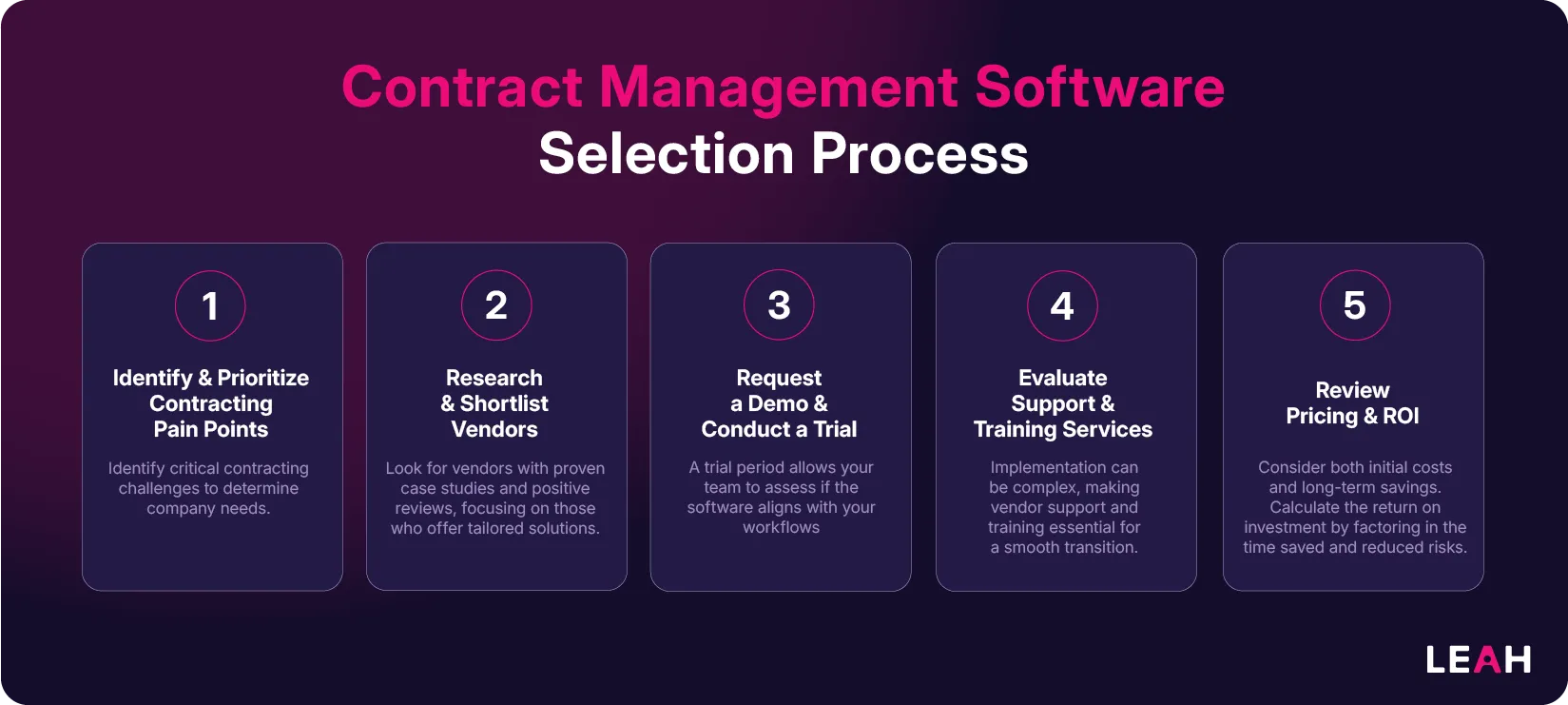
- Map your pain points. Document where contracts slow down or create risk, in legal and in the business teams legal supports.
- Research vendors. Build a long list, then shortlist against your must-have requirements.
- Run scripted demos. Ask each shortlisted vendor to perform the same tests with your own contracts, using the checklist above.
- Assess implementation and support. Compare migration plans, training, support response times, and who will do the configuration work.
- Build the ROI case. Estimate time saved, risk reduced, and value recovered after signature, and agree on how you will measure it.
Looking Ahead: Transforming Enterprise Operations
Contract management keeps changing quickly. Organizations that invest in the right contract management software are not just buying a tool; they are investing in their future competitive advantage.
Here are a few things to keep in mind:
Digital Transformation is No Longer Optional
As business relationships and regulatory requirements grow more complex, manual contract management becomes harder to sustain. Modern contract management software is a cornerstone of digital transformation, enabling legal departments to:
- Reduce contract processing time
- Minimize human error in contract creation and review
- Free up legal resources for strategic work
- Maintain comprehensive audit trails and compliance records
The AI Advantage Becomes Standard
As AI matures, buyers increasingly expect AI capabilities as a standard part of contract management software. Leading solutions now offer:
- Predictive analytics for risk assessment
- Automated contract classification and data extraction
- Recommendations for clause optimization
- Real-time insights into contract performance and obligations
- Agentic AI with domain-specific capabilities
Future-Proofing Operations
Selecting contract management software is about solving today's challenges and preparing for tomorrow's. Consider how your chosen solution will:
- Scale with your organization's growth
- Adapt to new regulatory requirements
- Integrate with emerging technologies
- Support increasingly complex global operations
Taking the Next Step
As you evaluate your options, choose a solution that fits both your current needs and your future plans. Start with the requirements checklist above, then use it to run your RFP and demos.
FAQ
What is contract management software for legal departments?
Contract management software for legal departments is a CLM system built around how in-house legal teams work: intake, drafting from approved templates, review against a playbook, approvals, signature, storage, and obligation tracking. It gives lawyers control of the language and the rules while letting the business self-serve on routine agreements. The result is one record of every contract and where it stands.
What should you consider when choosing a contract management solution for a legal team?
Start with the work your lawyers do most often and the risks they worry about, then turn those into testable requirements. The most important considerations are usually playbook-based review, approval rules that legal can configure, a searchable repository, obligation and renewal tracking, security and access controls, and integrations with the systems where contracts start. Test each one in a scripted demo with your own contracts.
Which CLM features matter most for legal operations?
For legal operations, the features that matter most are the ones that make legal's work measurable and controllable: structured intake, workflows that legal ops can change without IT, reporting on volumes and cycle times, and an audit trail for every contract. AI review and extraction help most when every result links back to the source clause, so lawyers can verify it.
Is CLM software the same as legal contract management software?
Mostly, yes. "CLM software" is the industry term for platforms that manage the whole contract lifecycle, while "legal contract management software" usually describes the same category from legal's point of view. Some tools sold as legal contract management software cover only part of the lifecycle, such as storage or e-signature, so check that a product handles intake, negotiation, and post-signature obligations before you shortlist it.
Which providers should a legal department shortlist for AI contract management?
Shortlist the vendors that pass your must-have requirements, not the ones with the longest feature lists. Analyst evaluations such as The Forrester Wave™: Contract Lifecycle Management Platforms and the Gartner Magic Quadrant for Contract Life Cycle Management are useful starting points, and the vendor comparison linked above summarizes the main options. Leah is a Leader in The Forrester Wave™: Contract Lifecycle Management Platforms, Q4 2026.
How can contract management software support remote or distributed legal teams?
A cloud-based CLM gives every lawyer the same templates, playbook, and contract record, wherever they work. Requests, approvals, and comments happen inside the system instead of in individual inboxes, so work can move between time zones without losing context. Integrations with tools such as Microsoft Teams, Slack, and Outlook let people act on contracts from the tools they already use.
Ready to Transform Your Contract Management?
Leah Agentic CLM is a contract lifecycle management platform in which AI drafts, reviews, routes, and tracks contracts while your legal team approves the decisions that matter. It includes guided intake, playbook-driven review with redlines returned as tracked changes in Microsoft Word, conditional approval routing, a searchable repository, and obligation tracking with renewal alerts. Learn more about Leah Agentic CLM, or request a demo and bring your own contracts.