
Quick answer: Legal intake is the process a legal team uses to receive, record, assess, and route requests for legal help, so each request reaches the right person with the information needed to act. For an in-house legal department, the legal intake process usually runs in five stages: receive the request through one front door, triage it for completeness, type, and risk, assign it to the right lawyer or a self-service path, review it in detail, and keep the requester and approvers informed until it is closed.
In a law firm, intake means screening a prospective client or case, including a conflict check, before accepting it. This guide focuses on in-house teams: what a good intake form asks, how requests are routed, and how each stage changes when you move it from email to a digital workflow.
If you were asked to name the professionals with the most effective legal intake processes, you might only think of law firms. Client and matter intake is, after all, a crucial step before outside attorneys can represent an individual or organization they haven't worked with before. In-house legal teams need an intake process too, because they also have clients: the sales, procurement, HR, finance, and product teams that send them work every day.
What Is Legal Intake?
Legal intake is how a business or law firm receives and assesses a potential client, case, project, or legal request, and checks it for red flags before work starts. In a law firm, intake screens a prospective client or matter: a conflict with an existing client, a case the firm is unlikely to win, or a matter that would take more time, people, or money than it is worth. In an in-house legal department, intake is the front door for requests from the rest of the business, such as:
- Reviewing a customer, supplier, or partner contract, or a nondisclosure agreement
- The approach to acquiring another company and related contracts
- A purchase or lease agreement for a real estate property
- A claim that a competitor misused or copied the company's trademarks or other intellectual property
- A former employee's unfair dismissal claim against the company
- A class action filed against the company over consumer injury or illness
The volume of discussions, messages, decisions, and next steps around these requests is significant. A structured intake process gives legal one place to see every request, takes the guesswork out of assignments, and brings red flags to the surface instead of leaving them buried in an inbox. For growing and regulated organizations, intake is how legal triages everything that comes in: assigning most requests to the right lawyer based on expertise and experience, sending routine ones to a self-service path, and replying quickly when a request is not a good fit or a relationship is too risky under existing agreements. For contract requests, intake is also the first step in the wider contract management process.
Legal intake form checklist: what to ask and why
Most delays in legal work start with a request that arrives without the facts a lawyer needs. A good intake form collects those facts once, in a consistent format, and uses the answers to route the request. Use the checklist below as a starting point, and show the contract-specific fields only when the request is about a contract.
| Field | Why legal needs it | Required or optional |
|---|---|---|
| Requester and team | Tells legal who to contact and lets you report demand by business unit or cost center | Required (prefill from sign-in where possible) |
| Request type | Drives the routing rule and the follow-up questions the form shows, for example NDA, new contract, contract review, legal question, dispute, privacy, or employment | Required |
| Description and goal | Defines the deliverable, so the lawyer knows what "done" looks like | Required |
| Counterparty name | Needed for conflict, sanctions, or existing-agreement checks, and to find related contracts | Required for contracts and disputes |
| Whose paper | A request on your approved template can often go to self-service; the counterparty's paper needs review | Required for contracts |
| Value or exposure | Sets the approval threshold and the risk tier | Required for contracts (a value band is enough) |
| Deadline and reason | Separates real deadlines, such as a board date, a go-live, or a filing date, from "ASAP" | Required |
| Draft and documents | Lets review start without chasing attachments | Required if a draft exists |
| Personal data | Triggers privacy or security review, and a data processing agreement where needed | Required (yes, no, or unsure) |
| Requested changes | Flags departures from standard terms before review starts | Optional |
| Business approver | Lets the routing rule collect the right approval at the right time | Required above your value threshold |
| Countries and law | Decides whether a local lawyer or outside counsel is needed | Optional unless the request is cross-border |
| Sensitivity | Limits who can see investigations, employee matters, or deals in progress | Required (yes or no) |
| Related request | Links follow-up requests to the original and prevents duplicates | Optional |
Keep the form short. Prefill anything your systems already know, and hide questions that do not apply to the request type. A form that asks every question for a routine NDA pushes people back to email.
Routing example: three requests
The requests below are fictional. They show how the answers on the form decide what happens next.
| Request | What the form shows | Routing decision | Who acts |
|---|---|---|---|
| Routine NDA | Sales needs a mutual NDA with a prospect, on the company template, with no requested changes | Self-service: the requester generates the NDA from the approved template and sends it for signature; legal is not assigned, but the request is logged | The requester; legal only if the prospect edits the NDA |
| Incomplete request | "Please review this supplier contract ASAP", with no draft attached, no value, and no reason for the deadline | Returned to the requester with a list of the missing fields; the service-level clock starts when the request is complete | The requester first, then the commercial lawyer the routing rule assigns |
| Exception | Marketing uploads a vendor's own terms for an analytics service that will process customer personal data; the vendor wants a lower liability cap than your policy allows; the value is above the approval threshold | Routed to commercial counsel and the privacy lead; a data processing agreement is required; the business approver and finance are notified | Counsel decides on the exception; the business approver signs off on the commercial risk |
Requests like the first one are good candidates for self-service. If your team can let sales self-serve routine contracts on approved templates, lawyers have more time for the third kind of request. For the privacy step in that case, see our guide to data processing agreements.
How Legal Intake Differs for In-House Counsel
When law firms assess prospective clients, they can take on a client for a single matter or on a retainer, or decline the work. In-house teams rarely have that choice: the business is their client, and requests keep coming. Intake for in-house counsel is less about accepting or declining and more about triage: deciding what needs a lawyer, what can follow a template or self-service path, what needs outside counsel, and in what order.
Automating the high-volume, repetitive parts of that work, such as collecting information, routing, and status updates, frees lawyers to spend more time advising executives and stakeholders on strategic matters and less on administration. It also helps legal show the value it adds to the business, not only its cost. Other benefits for in-house legal teams include:
- Broader visibility to legal requests and status
- Receiving reliable, consistent instructions
- Elimination of duplicate requests
- Less administration and correspondence
- Access to data and analytics
Stages of an Effective Legal Intake Process for Legal Departments
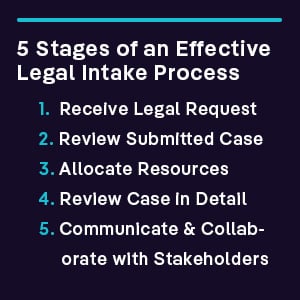
Here are the five stages of a legal request process, and what changes when you move each one from manual handling to a digital workflow.
1. Receive the Legal Request
The Manual Process: A lawyer receives a request through Outlook, Slack, Teams, or Gmail. Many requests come over the phone or through the legal department door. A paralegal reviews each request and decides, as best they can, who on the legal team should handle it. Lawyers end up with a lot of administrative work, often outside their expertise.
The Automated Digital Process: Requests arrive through one front door: an intake form or portal, or an add-in that captures the request in the email or chat tool people already use. The form collects the fields in the checklist above, so triage and assignment can start immediately. Requesters can check a dashboard for the status of their requests and any approaching deadlines, and the general counsel or head of legal operations can see how long requests take to be picked up and completed.
2. Review the Submitted Query
The Manual Process: The lawyer who is assigned to a request reviews it at their earliest availability. They manually flag any concerning terms and conditions as they carefully read through the documents. The whole process is difficult to schedule around the constant inflow of new requests and the backlog of complex existing ones. There may be a few calls to the requester to clarify the intended outcome and other details.
The Automated Digital Process: Triage checks the request for completeness, classifies it by type, and assigns a risk tier, using the answers on the form and, where available, AI that reads the attached documents. Routine questions, such as "when does this contract renew?" or "what is our liability cap with this supplier?", can often be answered from the contract repository without a lawyer opening the file, as long as each answer links back to the clause it came from so it can be checked.
3. Allocate Legal Resources
The Manual Process: Requests are received and distributed through email, instant messaging, or whoever is lucky enough to answer the phone or the office door.
The Automated Digital Process: Routing rules send each request to the right lawyer based on request type, value, risk, jurisdiction, workload, and expertise. In-house legal can loop in outside counsel as needed. Reports show request cycle times, where requests come from, and how work is balanced across the team.
4. Review the Request in Detail
The Manual Process: Lawyers work through the matter and any related matters. As the deeper review takes place, more requests continue to come in. Overloaded lawyers may hesitate to engage with the rest of the company for fear of adding to their backlog. Extensive research may be needed.
The Automated Digital Process: Automated review compares documents with your playbook and flags terms that need attention, so the lawyer starts with the issues rather than a blank read. Research may still be needed, but the subject-matter expert has more time for it. Along the way, "child requests" that grow out of the main request, such as a data processing agreement or a side letter, can be linked back to the original request.
5. Communicate and Collaborate with Stakeholders
The Manual Process: Legal professionals and their colleagues from across the business communicate via Microsoft Teams, email, and other channels about any concerns with the matter. There will likely be several status checks by the requester because they have limited visibility into the progress the lawyer is making on the request.
The Automated Digital Process: Requesters can see the status of their request, notes, and open questions without chasing the lawyer. Approvals and signatures are captured along the way, as well as any subtasks. Employees from across the business can be given visibility and access rights based on their role, or their involvement with the clients, suppliers, partners, or other parties involved in the request.
Legal intake best practices
- One front door. Route every request through the same form or mailbox, and redirect side-channel requests to it politely but consistently.
- Short, conditional forms. Ask only what the request type needs, and prefill what you already know.
- Written routing and self-service rules. Publish which requests go to which lawyer, which go to outside counsel, and which the business can handle on approved templates.
- Service levels that start when a request is complete. This rewards complete requests and makes your response times fair to measure.
- A compliance record. Keep who asked, what was decided, who approved it, and any privacy, privilege, or sensitivity flags with the request, and follow your retention rules.
- Monthly measurement. Track request volume by type and business unit, the share of requests that arrive complete, time to first response, time to close, and how much routine work went to self-service. Our guide to contract management KPIs shows how to define measures like these.
Automate Your Legal Requests with Leah
Leah Agentic OS runs legal work as well as procurement and finance work. For contract requests, guided intake and the Outlook Add-in let people start a contract from a form or straight from email; conditional approval routing sends each request by value, risk flags, jurisdiction, or contract type; and the contract helpdesk answers questions about any contract, with each answer linked to the clause or document it came from. See how Leah legal intake works, or request a demo to discuss your team's needs.
FAQ
What is legal intake?
Legal intake is the first step in handling a legal request: receiving it, recording the key facts, checking it for completeness and risk, and routing it to the right person. In law generally, intake means this screening step at the start of a matter: law firms screen prospective clients, courts and agencies screen new cases or applications, and in-house legal teams screen requests from the business. In each case, the goal is to decide quickly what the request needs and who should handle it.
What is matter intake in a corporate legal department?
Matter intake is intake for requests that become matters: tracked pieces of legal work such as a dispute, an investigation, a transaction, or a significant contract negotiation. The intake step opens a matter record with the parties, type, owner, outside counsel if any, budget, and key dates, so work, documents, and spend can be tracked against it. Smaller requests, such as a quick question, can be logged without opening a full matter.
How do corporate legal departments automate matter intake?
Most start by replacing email requests with one intake form or portal, then add routing rules by request type, value, risk, and jurisdiction. Next come self-service paths for routine work, such as NDAs on the approved template, and status updates requesters can see without asking. AI can help classify requests and read attached documents, but a lawyer should still own the decisions that carry legal risk.
What are legal intake best practices?
Use one front door, keep the form short and conditional, and write down your routing and self-service rules so everyone knows what goes where. Start each service level when a request is complete, not when it is first sent. Review volume, completeness, and cycle times monthly, and adjust the form and rules based on what you find.
How does legal intake support compliance?
Intake is where you record who asked for what, when, what legal decided, and who approved it, which gives you an audit trail for each request. A good form also flags requests that involve personal data, investigations, or privileged advice, so the right reviewers are involved and access is limited. Keep that record with the matter or contract, and follow your organization's retention rules.
How is client intake at a law firm different?
At a law firm, client intake is how the firm decides whether to take on a new client or matter. It usually includes collecting the prospective client's details and the facts of the matter, running a conflict check, assessing the merits and the resources needed, and, if the firm accepts, sending an engagement letter. The details depend on the firm and the professional rules that apply to it; this guide focuses on intake inside corporate legal departments.